Origami 3D: Learn & Play, interactive 3D folding lessons
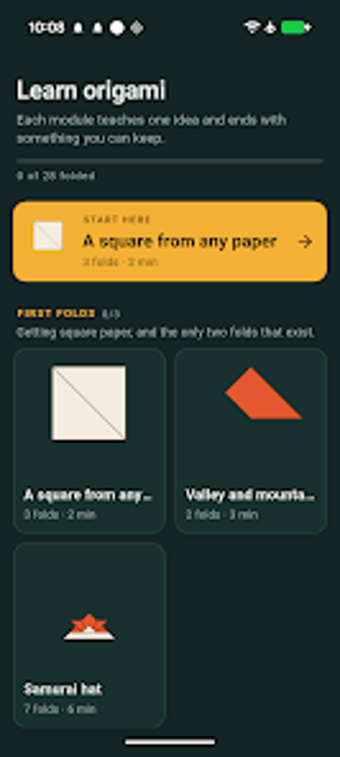
Origami 3D: Learn & Play by BinaryScript is an Android educational app that turns paper folding into an interactive 3D learning tool. It uses a real-time 3D folding engine to animate each fold, letting users rotate, zoom, and scrub animations to follow which layers move. Lessons present step-by-step animations, plain-language notes, adjustable playback, and a left-handed mode. It suits learners starting from elementary skill levels and supports collaborative practice at home.
A real-time 3D view makes layer movement explicit
The app uses a dedicated 3D folding engine to replace static dotted-line diagrams with visible motion, showing exactly which layer moves and where it lands. The interactive viewer lets the learner rotate and zoom the paper to inspect folds from any angle. Layer-splitting view highlights how panels separate during a fold. Controls include basic camera rotation, pinch-to-zoom, and a manual scrub slider for precise frame control.
Stepwise animation and slow-motion support deliberate practice
Lessons unfold as animated, step-by-step instructions that demonstrate the actual movement of paper layers rather than static snapshots. The app offers adjustable playback speed and a slow-motion option, plus a scrub feature to move backward and forward through a single fold. Plain-language notes and "watch this" indicators call out common mistakes, which helps learners translate observed motion into repeated, hands-on attempts.
Accessibility and device fit aim at hands-on learners
The app includes a left-handed mode that mirrors paper orientation for users who fold with their left hand, reducing confusion when mirroring steps. It is optimized for both phones and tablets, accommodating close-up detail on larger screens and one-handed use on phones. These choices suit family learning sessions and solo practice where physical paper and the screen work together in the same workspace.
Structured lessons and local progress tracking support paced study
The curriculum is arranged into multiple modules and dozens of lessons so learners progress from basic valley and mountain folds to complex bases. The app records completed lessons locally on the device, letting learners pick up where they left off without creating an account. This course-style structure encourages repetition and staged skill development across short practice sessions.
Practical, private practice for tactile learning at home
The developer's stated privacy-first approach, with no accounts, no ads, and no collection of user-generated content, positions the app as a private, device-contained learning aid. Pair short, hands-on practice sessions with the app's visual lessons to build muscle memory for complex folds. For households and hobbyists who prefer focused, offline study and clear visual guidance, the app is a practical choice.